How many AI agents does your company have running in production right now? If the answer doesn’t impress you, the problem isn’t the models.
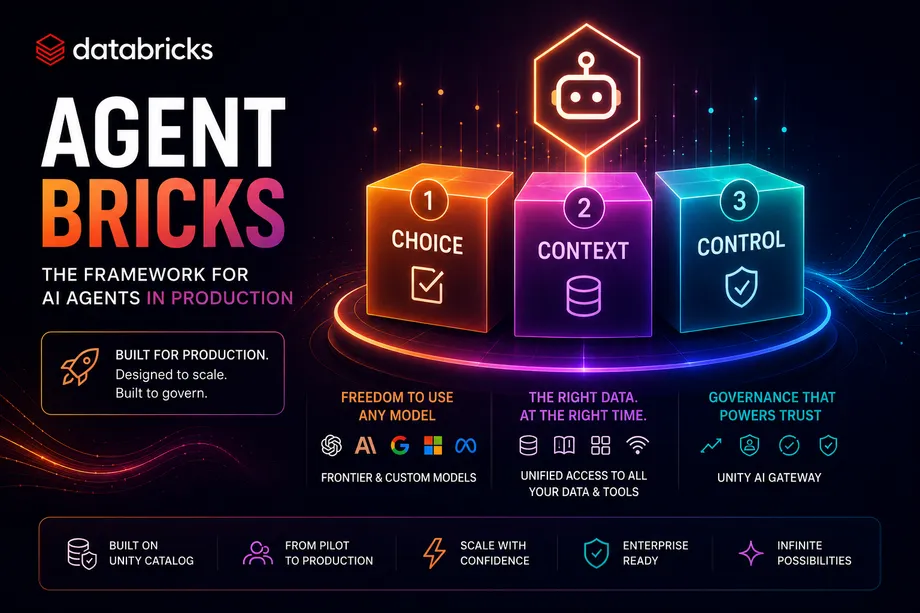
Agent Bricks is Databricks’ framework that organizes everything you need to move from pilots to production around three pillars: Choice, Context, and Control — without stitching five different tools together.
At Data + AI Summit 2026, Kasey Uhlenhuth took the stage with an uncomfortable question: why are teams still building infrastructure instead of agents?
The answer was on the slide behind her. Agents fail in production not because the models are bad. They fail because they access the wrong documents, pull data from the wrong PDFs, pick the wrong tool, or simply can’t connect to the systems where an organization’s real information lives.
The result: broken connection attempts, incorrect joins, and agents that “almost work” but never make it to production.
Agent Bricks was built to close that gap.
The problem: infrastructure instead of agents
6 failures that block agents from reaching production
Without the right infrastructure, the model is never the problem
CRITICAL
01
Misses key documents
No access to document corpus context
02
Pulls wrong data from PDFs
No native Document Intelligence layer
03
Incorrectly joins table data
No Genie Ontology as context layer
04
Chooses the wrong tool
No governed Agent Tools catalog
05
Can’t read from Slack or external data
No Managed External MCP integrated
06
No centralized governance
No Unity AI Gateway or smart policies
Agent without adequate infrastructure
Sources
Documents
PDFs
Delta Tables
Tools / MCP
External Data
Agent without context
Result in production
⚠ Misses key documents
⚠ Pulls wrong data from PDFs
⚠ Incorrectly joins data
⚠ Chooses wrong tool
⚠ Cannot read from Slack
The solution is not a better model. It is the right platform.
The three pillars of Agent Bricks
Agent Bricks is Databricks’ framework for building, deploying, and governing enterprise AI agents, announced at DAIS 2026. It is organized around three pillars that cover every aspect of an agent’s lifecycle.
CHOICE
Models
Frontier Models and Custom Models. Support for leading providers: OpenAI, Anthropic, Meta, Mistral, and more.
Orchestration
Managed Omnigent, Custom Agents, Agentic Tasks. Compatible with LangGraph, CrewAI, Jino, and other OSS frameworks.
CONTEXT
Knowledge, Data & Memory
Documents, tables, volumes, Memory API, and Lakebase. Agents access structured and unstructured information from Unity Catalog.
Tools
MCP, Skills, and Agent Tools. Connect agents to external systems — GitHub, Slack, Salesforce, Jira — with native governance.
CONTROL
Deployment
Databricks Sandbox, Agent Deployment, and Durable Execution. From prototype to production without rearchitecting.
Governance
Unity AI Gateway with observability, evaluation, authentication, and smart policies applied in real time on every model call.
Agent Bricks framework architecture
AGENT BRICKS
CHOICE
Models
Frontier + Custom OpenAI · Anthropic · Meta
Orchestration
Managed Omnigent LangGraph · CrewAI · Jino
Any model
CONTEXT
Knowledge & Memory
Docs · Tables · Volumes Memory API · Lakebase
Tools
MCP · Skills Agent Tools
Enterprise data
CONTROL
Deployment
Sandbox · Deployment Durable Execution
Governance
Unity AI Gateway Obs · Auth · Policies
Runtime governance
Databricks Agent Tools: enterprise context
The Context pillar has a layer worth exploring in depth. The classic enterprise agent problem is not the model — it is that the model does not know where to look or how to interpret an organization’s actual data.
Databricks Agent Tools: the bridge between Unity Catalog and the agent
Sources available in Unity Catalog
Documents (transcripts, reports)
PDFs (contracts, invoices)
Structured data (Delta tables)
External Data (MCP connect)
Capabilities unlocked
Document Intelligence
Managed External MCP
Genie Ontology as context layer
Permissions inherited from Unity Catalog
The key here is Genie Ontology: it acts as the enterprise context layer between your data sources and the agent, translating natural language queries into correctly governed accesses against the organization’s real data.
Context flow: from data to the agent with governance
Unity Catalog
Documents
PDFs
Delta Tables
Tools / MCP
External Data
Genie Ontology
Enterprise context layer
Agent
Document Intelligence
Semantic understanding of docs and PDFs
Managed External MCP
Governed connection to external systems
Agent Memory Services
Prefs · History · Sessions on Lakebase
Agent Memory Services
One of the most significant announcements in the session was Agent Memory Services — the ability for agents to remember across sessions, a limitation that has been blocking adoption in real-world use cases.
User preferences
The agent remembers response style, language, detail level, and individual preferences across conversations.
Conversation history
Agents can resume previous threads with full context, without users having to re-explain the background every time.
Shared sessions
Agent sessions persist in Lakebase, enabling team collaboration and full auditability of every interaction.
Agent Memory Services stores data in Lakebase, Databricks’ native database, with the same Unity Catalog access controls and governance as the rest of the stack.
Unity Catalog: your head start on day 1
This was the most important point of Kasey Uhlenhuth’s presentation: for organizations that already have Unity Catalog in place, Agent Bricks is not starting over. It is activating new capabilities on a platform they already know, already govern, and already trust.
Without Unity Catalog
Manual governance per each agent
No centralized lineage or audit trail
Integration infrastructure built from scratch
AI spend ungoverned at the model level
With Unity Catalog + Agent Bricks
Governance inherited automatically
Lineage and audit in Unity Catalog
Enterprise context ready from day one
Unity AI Gateway governs spend at runtime
Frequently asked questions
DOES NOT REPLACE THEM
Agent Bricks is a platform framework that integrates with them. The Orchestration sub-pillar explicitly supports LangGraph, CrewAI, Jino, and other OSS frameworks — alongside Managed Omnigent for organizations that prefer a fully managed option.
Think of Agent Bricks as the operating system and LangGraph or CrewAI as the applications running on top of it.
PILLAR: CHOICE
Omnigent is Databricks’ meta-harness for multi-agent orchestration. In its managed form (Managed Omnigent), it is available as a component of the CHOICE pillar in Agent Bricks. It installs on top of existing harnesses like Claude Code, Codex, or Cursor without rewriting anything, adding runtime governance and shared sessions.
Managed Omnigent removes the need to choose and maintain your own orchestrator — especially useful in enterprise environments with multiple teams and concurrent agents.
PILLAR: CONTROL
Unity AI Gateway is the governance component of the CONTROL pillar. It acts as a single endpoint that intercepts all model and agent calls, applies real-time policies, records observability data, governs spend, and authenticates every request — regardless of which model provider is used.
One gateway for all providers: OpenAI, Anthropic, Meta, and custom models. Policies are applied centrally, not agent by agent.
ANNOUNCED AT DAIS 2026
Agent Memory Services stores data in Lakebase and allows agents to maintain user preferences, conversation history, and shared sessions across interactions. Check with your Databricks account team for regional availability.
Memory data is governed by the same Unity Catalog access controls as the rest of the stack — no separate session storage infrastructure required.
DOES NOT START FROM SCRATCH
If your organization already has Unity Catalog implemented, Agent Bricks activates capabilities on top of that existing infrastructure. The enterprise context (data, documents, tables), governance, and permissions are already defined — Agent Bricks inherits them automatically.
For most Databricks customers, day 1 with Agent Bricks is activation, not construction. All enterprise context already lives in Unity Catalog.